

 Français
  Español
  Deutsch
  Italiano
  Português
 Product Photos With AI: Possibilities and Limits
Changing the backdrop of a real photo, creating a mood, avoiding misleading the customer: what AI allows for illustrating a product, and what it distorts.
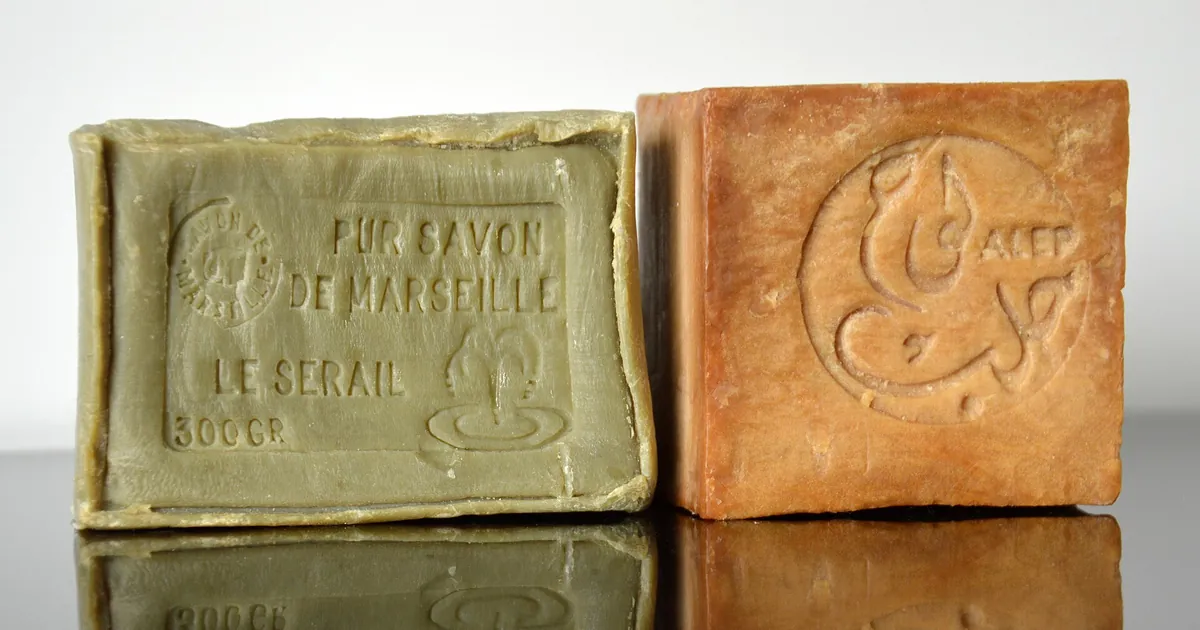
A small-batch soapmaker sells his olive oil soap bars in his online shop. His photos, taken on the kitchen table, show a sharp product but a tired background. He types into a generator: "product photo of a handmade olive oil soap, ultra realistic." The image is superb. The soap it shows doesn't exist: the shape, color, texture, and label are the tool's invention. If he publishes it on his product page, a customer will receive something other than what they saw.
Before asking yourself whether AI makes a beautiful product photo, ask whether the image faithfully represents what you sell. Depending on the answer, you have two very different uses.
Two uses not to confuse
| Use | What the AI does | Risk |
|---|---|---|
| Creating an imaginary product | Invents the whole object from a description | The customer thinks they're seeing your real product |
| Dressing up a real product | Keeps your photo and changes the setting, light, or mood | The product itself may be distorted |
The first use suits mood visuals, a mockup to discuss with a client, or a packaging idea. For a sales listing, it's risky: an image that gives a false idea of the item can be considered misleading, and a marketplace may also reject it. Check the rules of the platform where you sell, and for a legal doubt, consult the relevant consumer protection authority (in France, the DGCCRF) or a consumer law professional.
The second use is safer: your object stays at the center. What's added around it is the setting.
Dressing up a real photo
First take a clean photo of your product: plain background, even light, sharp product, a few angles. It's your raw material, and the quality of what the AI does around it depends directly on it.
In a tool that accepts a starting image, then describe the setting and ask it to leave the object as is:
Place this handmade olive-oil soap bar, unchanged, on a slab of dark slate next to a small branch of olive leaves and a folded linen cloth. Soft daylight from a window on the left, a few water droplets on the slate, warm neutral palette, shallow depth of field. Do not alter the shape, color, texture or embossing of the soap.
The last order is important: without it, the tool may round off a corner, change the embossed pattern, or erase an engraved mention. If your tool works with masks, you can also isolate the product and regenerate only the background, which protects the object better. The same area logic applies in the article on inpainting.
For lighting and framing vocabulary, the guide to photo vocabulary for AI images gives the terms that work.
What AI distorts most often
Always compare the final image with your real product, side by side, on a large screen. Here is what changes most often:
- Labels and logos. The text becomes blurry, invented, or wrong. If your packaging carries a mandatory mention or your brand, don't count on the AI: the subject is covered in Readable Text in AI Images. The most reliable approach is to add the label afterward.
- Proportions and scale. A bar of soap can look twice as big as it is next to a badly sized object.
- Colors. A slightly shifted shade is a problem when the customer orders based on color.
- Number of items. A set of three can become a set of four.
- Reflections and shadows. A shiny object that doesn't reflect its surroundings, or a shadow going the wrong way, gives away a composite.
- Hands holding the product. Fingers remain a weak point, as with portraits.
Three simple rules to stay honest
- The product on the listing is the real product. The photos used to decide on a purchase show what the customer will receive. AI can work on the setting, not on the item.
- Mood visuals are presented as such. A mood image in a banner or on social media, yes, as long as it doesn't suggest it's the item received.
- The rights and the tool's terms are checked. Commercial use depends on the tool and the plan: the point is detailed here.
If you publish on a marketplace or an advertising platform, also read its rules on retouched or generated images: they change, and some require a disclosure.
A series of tests to run with your product
Photograph your product on a plain background, with window light. Prepare three settings that match your customers, for example a stone bathroom counter, a wooden shelf, and a breakfast table. Generate each with the order "do not modify the object," then place the result next to the original photo. Keep only the versions where the label, shape, and color are identical to the original, and show them to someone close to you who knows the product: if something puzzles them, a customer will notice too.
Read next
AI images
Realistic AI portraits: avoiding the plastic look
Smooth skin, vacant stare, catalog smile: what gives away an AI portrait, the words to remove from your prompt, and the ones that make a face believable.
4 min read
AI images
Negative prompts: how to use them well, tool by tool
Why your 40-word list is useless, how to write a negative prompt that works, and what changes between Stable Diffusion, Midjourney, and FLUX.
5 min read
AI images
Art Styles in AI Images: Describing Without Imitating an Artist
Medium, period, line, palette: the grid for getting a precise, original style in AI images, without naming a living artist.
5 min read