

 Français
  Español
  Deutsch
  Italiano
  Português
 Tokens and the Context Window: Why the AI Loses the Thread
If your chatbot loses the thread after thirty messages, it's mechanical. What tokens are and how to sustain a long conversation.
In your first message, you asked your chatbot to keep a formal tone with readers and never go over ten lines. Thirty exchanges later, it's chatting like old friends and writing walls of text. It's neither bad faith nor a malfunction: your instruction may simply have slid out of what it can still read.
Two concepts explain this phenomenon and, with them, most of the roadblocks on long projects: the token and the context window.
A token is a piece of text
Language models read neither letters nor exactly words. They cut text into pieces, tokens, which are the unit they work with and the unit their capacity is measured in. If you want to see where this step fits in the overall workings, read our explanation of what happens inside a language model.
The splitting isn't natural to a human. A common word like "house" may form a single token, while a rare or long word like "antidisestablishmentarianism" will be cut into several, and a punctuation mark may count separately. The exact splitting depends on the model.
For English, OpenAI gives a frequently cited rule of thumb: a token is about four characters, roughly three quarters of a word. Other languages, French included, often consume a little more at comparable length. Above all, keep the general idea: the number of tokens follows the length of the text, with a margin of approximation. Some tools offer a counter if you need a precise figure.
This splitting also explains a well-known oddity. When you ask how many "e"s a word contains, the model doesn't necessarily see the letters one by one, which makes the task harder than it looks.
The context window, your work table
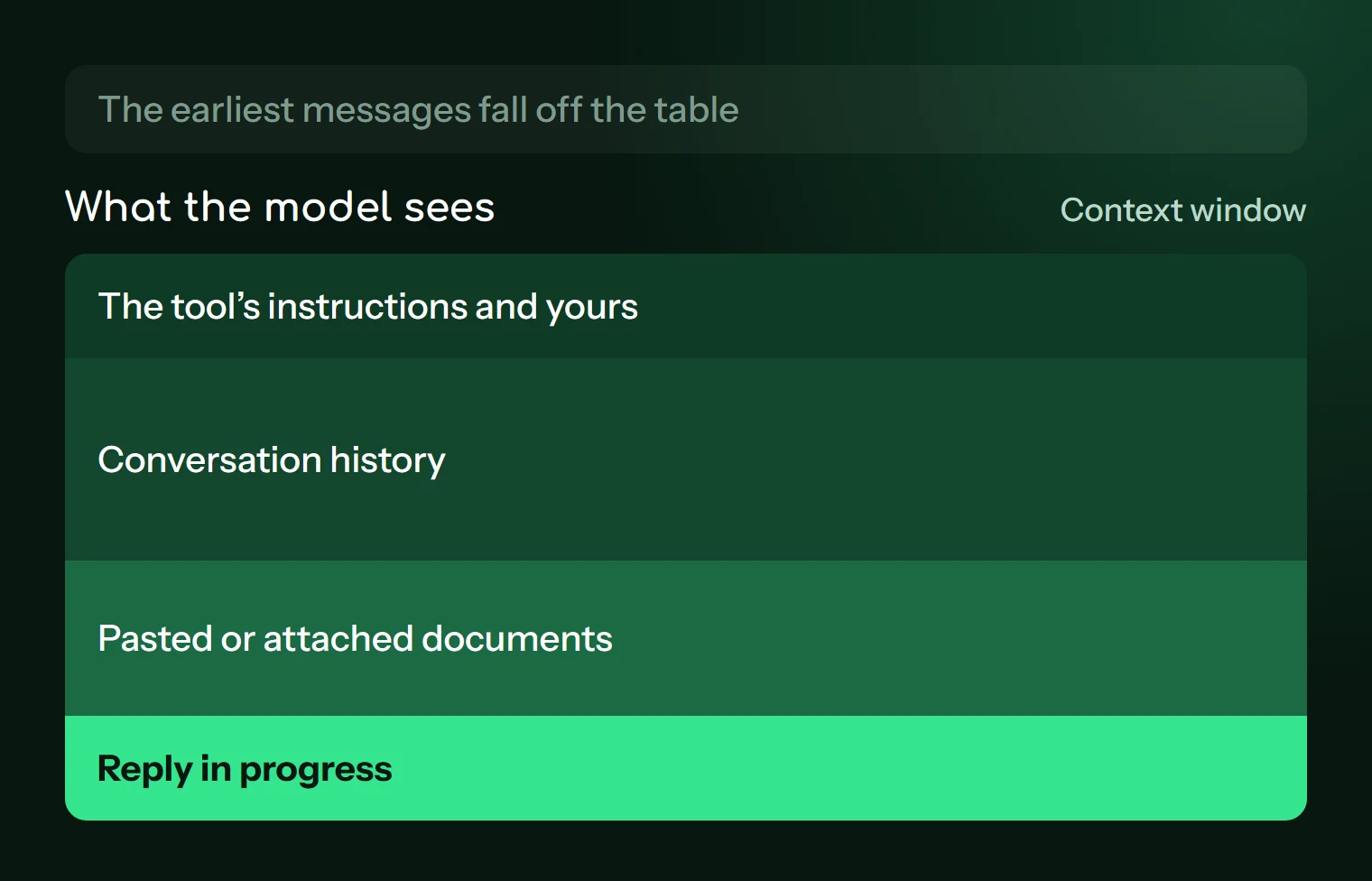
The context window is the number of tokens the model can take into account at the same time. Picture a work table: everything on it is visible, and everything that falls off the table no longer exists for the model.
On that table, there's more than just your latest question:
- the tool's instructions, which you don't see, and the custom instructions you may have set;
- the entire conversation history, your messages and its answers;
- the pasted or attached documents, or at least what the tool extracted from them;
- the answer being written, which takes up room too.
That last point often surprises people. If you fill the table with a huge document, there's less room left for the answer, which can end up truncated or thinner.
The size of this window varies a lot depending on the model and plan, and it has grown noticeably in recent years. The figure goes out of date fast, so check it in your tool's documentation when you need it.
What happens when the table overflows
Here again, the behavior depends on the tool, and it can change. Three cases occur in practice. Some tools drop the oldest messages. Others automatically summarize the start of the exchange, which preserves the essentials but loses the details, like a style instruction given in passing. Still others stop and ask you to start a new conversation.
In the first two cases, you often get no warning. Here are the signs that should alert you:
- it goes back to a habit you had corrected;
- it asks again for information already given;
- it contradicts a decision made earlier;
- it quotes loosely from a long document pasted at the very beginning.
The last case deserves suspicion: a model that's missing a passage doesn't always flag it, and may still answer plausibly.
A full window isn't the only culprit. Even before the limit, a long conversation accumulates failed attempts and reversals. All that material stays on the table and weighs on the next answer. A short, clean conversation often gives better results than a long one, even if the theoretical capacity is nowhere near reached.
On the cost side, tokens are also the billing unit for APIs, for input as well as output. Consumer subscriptions tend to apply usage limits instead, the details of which change. If you only use the web interface, the limits mostly concern you when you work with large volumes.
Sustaining a long conversation without losing the thread
Take a nonprofit treasurer preparing her financial report over several sessions. She'd do well to avoid a single 80-message conversation. Here's what works, from simplest to most structured.
One task, one conversation. When you change subject, open a new discussion. The old one won't clutter the new one.
Fix your message instead of piling on. If the answer goes sideways because of your prompt, use the message edit function, if your tool offers it. You avoid adding a failed answer and its correction to the table.
Paste the useful excerpt rather than the whole document. To review chapter 3 of a set of club bylaws, chapter 3 is enough. For cases where you truly need the whole document, see our method for working with long documents.
Restate the important instructions at the right time. An instruction repeated just before your request is more likely to be followed than one buried thirty messages up.
Write a handoff note. This is the most worthwhile move. Before leaving a conversation that has made good progress, ask it to summarize the state of the work, then restart from that summary in a fresh discussion.
We're going to continue this work in a new conversation, where you'll have access to nothing that came before. Write a handoff note that I can paste as is.

It must contain:
- the goal of the work, in two sentences;
- the decisions made and what was set aside, with the reason;
- the style and format instructions to follow, quoting the ones I gave you;
- the exact data and figures to keep, copied without rounding;
- what remains to be done, in order.

Don't add any information that doesn't appear in our conversation. If a point remains unclear or was contradicted, flag it in a "To confirm" section.
Reread this note before pasting it: it's a summary produced by the model, and it may forget a detail or reword an instruction wrongly. If your project comes up often, you can also split it up from the start, following the logic of the prompt chain: each step receives only what it needs.
Try it on your current conversation
Open your longest active conversation and ask: "List the instructions I've given you since the beginning, copying them word for word." Compare with what you actually wrote. If some are missing or distorted, you've just seen the limit in action, and you have a handoff note to write before you continue.
Read next

Understanding AI
Checking an AI Response: What to Verify, and How
Dates, numbers, invented sources, code: how to check an AI response according to the risk, without spending your whole day on it.
5 min read

Understanding AI
The EU AI Act Explained Simply: What Applies to You
The European AI regulation sorts uses by risk level. What it changes if you use a chatbot at work, plus a prompt to inventory your uses.
5 min read
Understanding AI
AI bias: how to spot it and limit it
Stereotypes, Anglo-American defaults, people-pleasing: a simple test to detect AI bias, plus prompts to correct it in everyday use.
5 min read